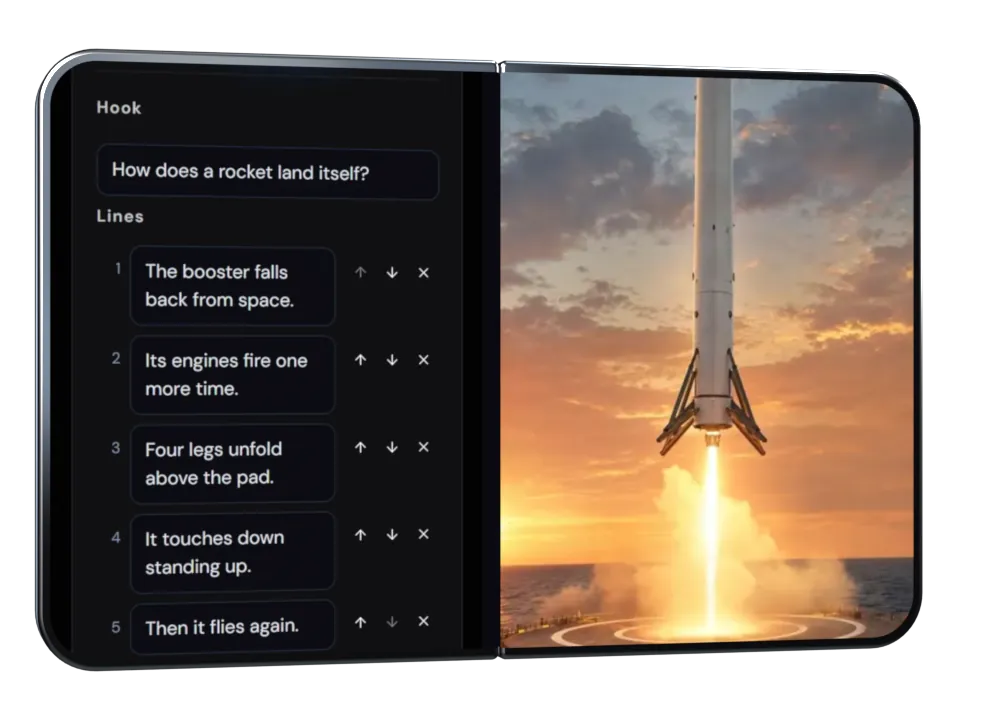
Left: the studio's script editor in our design preview, with a sample project. Right: a DreamWild team example Short on the same idea.
Built Behind A Channel Averaging 5-6 Million Views A Day.
We have run a Shorts channel averaging 5-6 million views a day. That experience shapes how we think about production: keep making, learn from the audience and put the next good idea into motion.
Historical experience from one of our own channels.
Keep The Good Parts. Improve The Rest.
Keep the script you like. Fix the line that needs work. Rerun a scene without discarding the rest, then review the finished video before release.
Give The Next Idea A Head Start.
Start from a format that already fits your channel. Develop a new topic, hook and story without rebuilding the production approach for every episode.
Keep Making, In One Studio.
Move from words to narration, scenes and a finished video in the same project. Spend the next session developing the story instead of finding where you left its parts.
Pick a Plan
Up to 35% Off
Starter
15% off
For first-time video creators
$29$29*USDfirst monthBilled monthly
1,500 credits every month
Enough for at least six 30-second Shorts a month.
🎁 2× credits first month
Free AI videos1 a day
Vesper AI agent chats15 a day
No watermarkEvery video
Commercial useIncluded
Save $54compared to monthly
Parallel generations: up to 2 videos
Upload to up to 2 YouTube channels
Access to selected models & features
Standard support
Credit rollover (not included)
Priority access to new AI features (not included)
Lowest cost per credit on annual (not included)
Creator
20% offDaily Shorts
For everyday content creation
$89$89*USDfirst monthBilled monthly
4,500 credits every month
Up to 45 30-second story Shorts a month.
🎁 2× credits first month
Free AI videos5 a day
Vesper AI agent chats40 a day
No watermarkEvery video
Commercial useIncluded
Save $216compared to monthly
Parallel generations: up to 3 videos
Upload to up to 5 YouTube channels
Access to all models & features
Priority support
1-month credit rollover
Priority access to new AI features (not included)
Lowest cost per credit on annual (not included)
Pro
30% offMost popular
For ambitious video projects
$249$249*USDfirst monthBilled monthly
12,500 credits every month
Up to 125 30-second story Shorts a month.
🎁 2× credits first month
Free AI videos15 a day
Vesper AI agent chats100 a day
No watermarkEvery video
Commercial useIncluded
Save $900compared to monthly
Parallel generations: up to 9 videos
Upload to up to 10 YouTube channels
Access to all models & features
👑VIP support
2-month credit rollover
Priority access to new AI features
Lowest cost per credit on annual (not included)
Max
35% offBest value
For high-volume content creation
$499$499*USDfirst monthBilled monthly
25,000 credits every month
Up to 250 30-second story Shorts a month.
🎁 2× credits first month
Free AI videos30 a day
Vesper AI agent chats200 a day
No watermarkEvery video
Commercial useIncluded
Save $2,100compared to monthly
Parallel generations: up to 12 videos
Upload to up to 20 YouTube channels
Access to all models & features
👑VIP support
3-month credit rollover
Priority access to new AI features
Lowest cost per credit on annual
*Prices include GST and VAT where applicable. Video costs vary with your format and model, the length you choose and any retakes. Check the quote before each paid step. Annual plans are paid upfront, with credits added monthly. Your subscription renews until you cancel. Videos you schedule to YouTube publish as private until YouTube approves our app.
Trusted by creators with combined 2M+ followers, 4B+ views+100
Frequently Asked Questions
Can I Edit Before Creating The Final Video?
Yes. Edit the script, choose your narrator and review the scenes. Change the part that needs another pass before making the finished video.
How Can I Keep A Regular Upload Schedule?
Make and review your next videos in the studio, then choose their YouTube upload times. Approve each upload yourself, or enable an upload rule for matching finished videos.
Can It Publish For Me?
Yes, on YouTube. Approve each upload, or turn on an upload rule for matching finished videos on your schedule. You choose when a rule is active and can pause it. The Automation for YouTube page explains the controls.